
Life is full of unexpected surprises. From a work laptop suddenly breaking down and a leaky roof or water tap, to the risk of job loss. While we cannot predict when worst-case scenarios will occur, we can prepare a financial safety net in the form of an emergency fund.
Before getting started, know your ideal target first:
-
Single / Unmarried: Minimum of 3–6x monthly expenses.
-
Married / With Dependents: Minimum of 6–9x monthly expenses.
To make saving feel manageable, follow these 4 practical steps to build your emergency fund from scratch:
1. Start Small to Build Your Emergency Fund—Consistency Is Key
Setting a multi-million rupiah target right at the beginning can often feel overwhelming, leading you to postpone saving altogether. The main key isn't how large your initial contribution is, but rather building the habit.
Start by setting aside Rp500,000 or 5% of your salary each month. Once this habit is formed and your initial milestone is met, you will naturally feel motivated to gradually increase the amount.
2. Isolate Emergency Funds in a Separate Pocket
Never mix your emergency fund with your daily savings or main operating account. Combining them makes the money vulnerable to impulsive spending disguised as "urgent needs."
Practical Solution with Jago
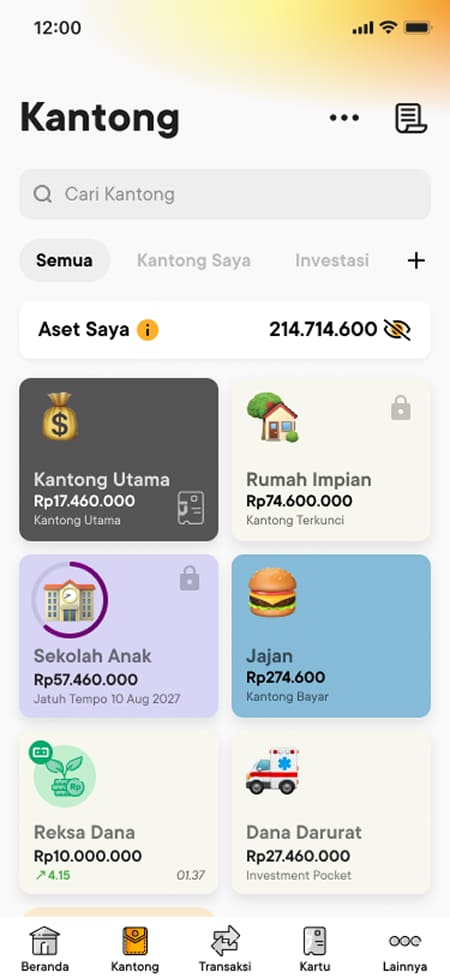
Create a dedicated Savings Pocket for "Emergency Fund" in the Jago app. For extra protection against online shopping temptations, lock your funds in a Locked Pocket or a Jago Term Deposit. The Jago Deposits can be withdrawn at any time without penalty fees when a real emergency strikes.
3. Automate Contributions to Your Emergency Savings Using Auto-Budgeting
Saving for an emergency fund becomes tough if you wait for "leftover money" at the end of the month. Apply the Pay Yourself First principle by setting aside your emergency allocation right on payday.
Practical Solution with Jago
Use the Auto-Budgeting feature in the Jago app if you are saving in a Saving Pocket or Locked Pocket. Set up an automated schedule so the system regularly transfers funds to your Emergency Fund Pocket. The saving process runs smoothly in the background without hassle.
4. Keep Saving Even After Reaching Your Initial Target
If you hit your emergency fund goal and haven't had to use it, don't stop saving right away. Over time, lifestyle changes, additional dependents, and inflation will naturally increase your daily living costs.
Continuing to allocate savings regularly ensures your financial safety net stays relevant and strong enough to protect your future.
Secure Your Finances Today with the Jago Pockets
Building an emergency fund doesn't require miracles—just a consistent system. The sooner you take that first step, the more peace of mind you will have facing life's uncertainties.
Ready to take your first step today? Open the Jago app and allocate your Emergency Fund Pocket now!