
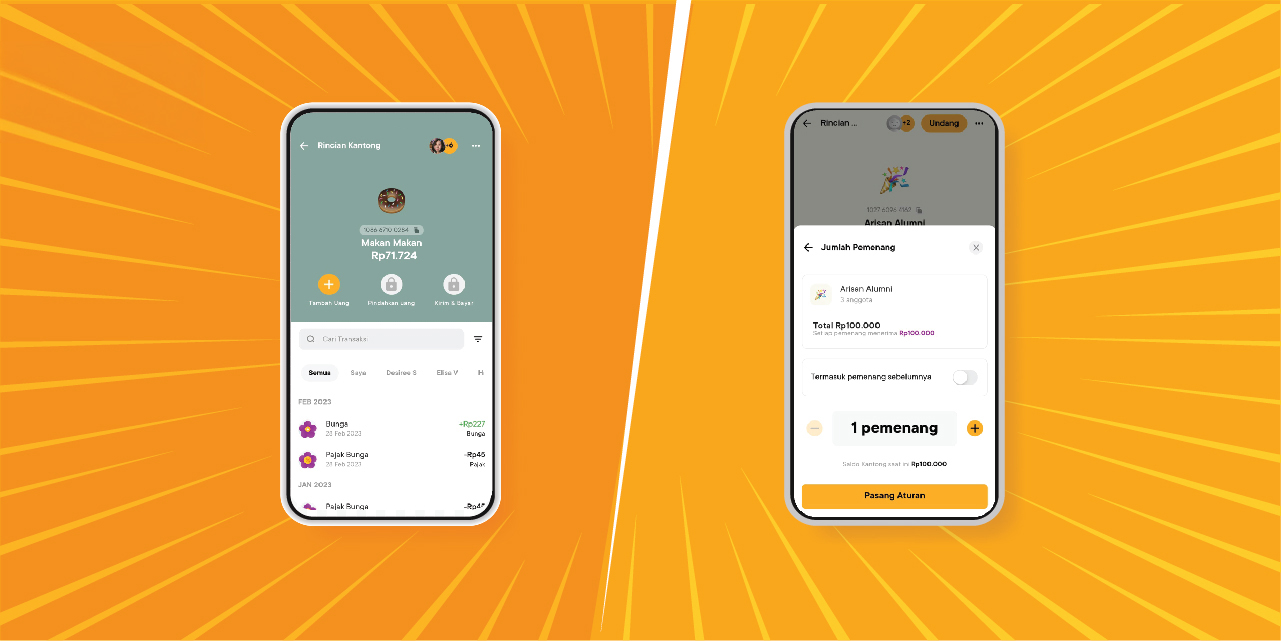

It's a lot of fun to be able to manage finances with other people. With a partner, for example, you two can lighten each other's burdens when managing the household budget together. With friends, managing finances together can minimize overspending because you can remind each other.
There are many purposes for financial collaboration. Some people want to achieve dreams or financial goals together, some others 'force' to build savings through arisan. There are those who want to simply chip in for an event. Whatever the goal is and whoever the financial collaboration is with, you can do it easily and practically with Jago through the Shared Pocket and Arisan Pocket.
The Shared Pocket and Arisan Pocket both make it easier for you to manage finances with those closest to you. By joining either the Shared Pocket or Arisan Pocket, each member can view the balance and history of using money or transactions in the Pocket from the Jago application on their respective mobile phones.
And, because each Pocket has its own account number, you don't need to worry about the funds in the Shared Pocket or Arisan Pocket being mixed up with funds in your personal account or other Pockets.
However, there are distinct differences between the Shared Pocket and the Arisan Pocket.
What is the Main Difference Between the Shared Pocket and Arisan Pocket?
1. Shared Pocket: The transparent solution for digital joint accounts
What is a Shared Pocket?
The Shared Pocket is a feature that allows you and others (partners, family, or friends) to collaborate within one transparent Pocket. All members have full visibility into the balance, transaction history, and individual contributions.
| Best For | Key Benefits |
| Digital Joint Account | Suitable for a family emergency fund or household operational account. It can also be used to collect funds for a trip with friends or save for any goal that requires collaboration. |
| Managing Finances with a Partner | Ideal for monthly family budgeting or collecting joint savings for big goals (e.g., house down payment). |
| Full Transparency | Every member can see who deposits and uses the funds. |
When to use a Shared Pocket?
Use the Shared Pocket when you need a sustainable saving place where every member has the same role and access to the funds for long-term goals.
The Shared Pocket can be used for both saving and spending purposes. Therefore, a Shared Pocket can be a Saving Pocket or a Payment Pocket, depending on your needs and those you invite.
If your Shared Pocket is a Saving Pocket, you and the Pocket members can set a joint target and also determine automatic saving rules by activating the automatic saving option in the Pocket.
If your Shared Pocket is a Spending Pocket, you can set a daily transaction limit and the role of each member—whether they can only view the balance or can also use the money in the Pocket.
How to create a Shared Pocket in the Jago application
Before changing a Pocket to a Shared Pocket, you need to create a new Pocket first. After that, you can apply the following steps:
1. On the Pocket Details page, tap the Invite button at the top of the screen.
2. Select the user you want to invite from your Jago Contacts or your phone's contacts.
3. Define roles for the invited users.
4. When the invitation is sent, your Pocket will automatically change to a Shared Pocket.
2. Arisan Pocket: Quickly collecting funds without worrying about turns
What is an Arisan Pocket?
The Arisan Pocket is specifically designed to facilitate arisan (rotating savings and credit association) digitally. Unlike the Shared Pocket, the Arisan Pocket operates based on the principle of rotation: funds are collected from all members, and at specific periods, one member (the arisan winner) receives the entire fund.
| Best For | Key Benefits |
| Online Arisan | Manages members' routine arisan fees automatically and on schedule. |
| Quickly Accumulating Money | Locks in members' commitment to depositing funds disciplinedly. |
| Arisan Management | The Jago system automatically conducts the draw and transfers the funds to the rightful winner. |
When to Use an Arisan Pocket?
Use the Arisan Pocket when the goal is to quickly accumulate funds through rotation rather than long-term savings that are accessed at any time.
The Arisan Pocket can only be used for arisan needs. Therefore, only within the Arisan Pocket will you find the Raffle add-on option. The Arisan Draw option can be added when creating a new Pocket or after creating a Pocket.
With the Raffle add-on option, you can determine the amount of money to be drawn, automatically draw the arisan winner, and transfer the funds directly to the winner's Main Pocket.
Furthermore, another difference between the Arisan Pocket and the Shared Pocket lies in member roles. Every Arisan Pocket member can only ‘view’ the Pocket. Money management and the arisan draw can only be conducted by the creator or owner of the Arisan Pocket. In other words, full responsibility lies with the owner.
How to create an Arisan Pocket in the Jago application
To create an Arisan Pocket right from the beginning, you can follow these practical steps:
1. On the Pockets page, click Create Pocket.
2. Choose Arisan Pocket.
3. Personalize the Arisan Pocket by changing the emoji, image, or background color and name it.
4. In the Add-Ons section, you will see Raffle add-on has been added to your pocket automatically. But if you want to add more add-ons, tap More.
5. When you are done, click Create Pocket.
Key Comparison of the Shared Pocket and Arisan Pocket
| Feature | Shared Pocket | Arisan Pocket |
| Primary Purpose | Joint Savings, Operational Account, Emergency Fund | Fund Rotation, Quick Fund Accumulation |
| Fund Access | All members can withdraw funds (with certain approvals) | Only the designated Winner can take the funds when it is their turn |
| Transparency | Fully Transparent (History and Balance Visible) | Transparent (Fees and Draw Schedule Visible) |
Choose According to Your Joint Financial Goals, Because Everything Has Its Pocket
The choice between the Shared Pocket and the Arisan Pocket highly depends on the group's needs:
-
If you are a couple who wants transparent family budgeting and to save for joint goals with friends or anyone else you wish, the Shared Pocket is the best choice.
-
If you are a group of friends who want to quickly accumulate funds based on rotation and without needing a manual draw, the Arisan Pocket is the answer.
Utilize both types of Pockets to make your joint financial goals more structured, transparent, and easy to achieve with Jago.