


For many people, saving money is not something that can be easily done. But, saving is important for the future and emergencies that can happen at any time. Thanks to advanced technology, saving is no longer difficult. Now, there's an easy way to save money with Jago's Auto-Budgeting feature.
The Importance of Automatic and Routine Saving
Before we discuss how Auto-Budgeting can help you save, let's first get to know the importance of saving automatically and regularly every month.
1. Not to use money carelessly up front
Have you ever bought something because you gave in to your urges? After making a purchase, it turns out you rarely use or don’t use the product at all. Usually, you splurge because you see that there is still a lot of balance in your account, especially days after payday. By saving in advance, you can minimize the careless use of money.
2. To be more certain in achieving your financial goals
Everyone has their own financial goals. In the next 5 years, you may want to have enough capital to start a business. By always saving regularly every month, you increase your chances of achieving your financial goals.
3. To save time
When saving is automatic, you no longer need to make manual transfers, whether for retirement savings, emergency funds or investments, such as mutual fund investments.
4. To be free from guilt when you want to pamper yourself
You can reward yourself after working hard every day. You might want to get a new gadget, buy a new pair of shoes or add your game collection. If you have set aside money for savings in advance, you can be free from guilt when you want to reward yourself by buying whatever you want. This is because the money you use is ’leftover’ money.
The Auto-Budgeting Feature: The Easy, Automatic, and Routine Way to Save in the Jago Application
If saving has become a habit, you don't need to worry anymore about whether you will have money for tomorrow or the future. Discipline is the key, and through the Jago application, you can save automatically, which makes that discipline feel effortless.
As the name suggests, the Auto-Budgeting feature in the Jago application can help you realize routine and automatic savings. To achieve your long-term financial goals, setting aside money can be done on payday (saving first).
How automatic transfer works with Auto-Budgeting in the Jago application
Before utilizing this feature, you need to create Saving Pockets first.
-
Purpose Segregation: So that your money doesn't get mixed up with other needs, such as spending for food and transportation, you can create separate Pockets. For example, you can create 1 Pocket for Retirement Savings, 1 Pocket for an Emergency Fund, and 1 Pocket for Investment.
-
Activation of Automation: Once the Pockets are created, you can set the money from your Main Pocket or the Pocket that serves as the source fund to enter the savings and investment Pockets automatically and routinely every month.
-
Guaranteed Consistency: With this automatic transfer, saving becomes consistent. The fun part is, you can relax while enjoying your savings continuously growing as desired.
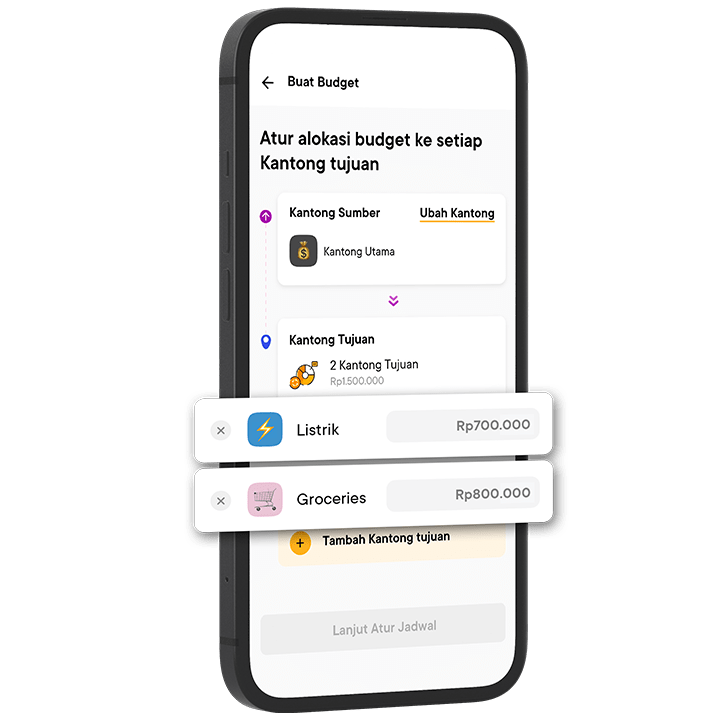
It's really easy to use the Auto-Budgeting feature. You can follow the simple steps on this page.
Quick Q&A About Jago Automatic Savings
1. What are the main benefits of using Jago's Auto-Budgeting feature?
The main benefit of this feature is creating automatic savings that are consistent and impossible to forget. With automatic transfers, the money for savings is immediately separated before it is used for spending, effectively overcoming wasteful habits.
2. What is another advantage of saving with Bank Jago through the Jago application?
You can have multiple Saving Pockets, each functioning as a separate account, all within one application, and completely free of monthly admin fees.
3. Can I set the frequency of automatic transfers to be something other than monthly?
Yes, the Jago Auto-Budgeting feature is very flexible. You can set the frequency of automatic transfers according to your needs, such as daily, weekly, or monthly.
4. Are there any fees for the automatic transfer feature in Jago?
The Auto-Budgeting feature (for internal transfers between your own Jago Pockets) is free.