


Have you ever received a call from an unknown number reporting an emergency or offering urgent assistance? In today's digital era, phone scams and psychological manipulation tactics are becoming increasingly diverse. Scammers no longer rely solely on technical hacking; instead, they exploit victims' panic and trust to trick them into surrendering personal data and draining their bank accounts.
To keep your finances safe, let's explore the common psychological manipulation tactics used by scammers, along with smart protection steps you can put into practice!
5 Psychological Manipulation Tactics in Phone Scams
Phone scammers typically orchestrate scenarios designed to prevent you from thinking clearly. Here are several of the most common manipulation tactics along with real-life examples:
1. Fabricating Threats and False Alarms
Scammers mislead victims with alarming news that demands immediate action.
Example: A caller impersonates a police officer or government official claiming a family member was in an accident, or alleges that your bank account is tied to a money laundering investigation.
2. Imposing Strict Time Limits and Forcing Rushed Decisions
The core principle of this tactic is creating an artificial sense of urgency so you don't have time to verify the facts.
Example: "Your account will be permanently suspended within 5 minutes unless you verify your details immediately," or offering a prize that expires if not claimed during the call.
3. Offering False Solutions (The Fake Savior)
Scammers pose as a "lifesaver" addressing an issue they actually invented themselves.
Example: The caller poses as a bank representative reporting suspicious transactions on your account, then offers to cancel them if you provide your OTP or PIN.
4. Impersonating Authoritative Figures
Scammers build false trust by leveraging the reputation of major financial institutions, courier services, or official authorities.
Example: Speaking in a polished, professional tone and referencing leaked personal details (such as your full name or date of birth) to convince you they are genuine officers.
5. Requesting Device Access or Screen Sharing
In more modern schemes, scammers direct victims to install specific apps or enable screen sharing while on the call.
Example: The caller claims they want to provide step-by-step technical guidance, when in reality their goal is to snoop on PINs, passwords, or authentication codes appearing on your phone screen.
Important: Avoid Opening Financial Apps During Phone or Video Calls
Whenever you are on a phone or video call, the risk of data leakage is significantly elevated. Scammers can exploit this window to observe screen activity, record confidential inputs, or coerce you into unauthorized transfers.
Therefore, a fundamental rule of digital safety is to never open banking apps or perform financial transactions while a call is active, especially when speaking with an unfamiliar number.
Security Protection Feature in the Jago App: Automated Call Defense
To counteract increasingly sophisticated online scams, a proactive layer of security is built directly into the Jago app.
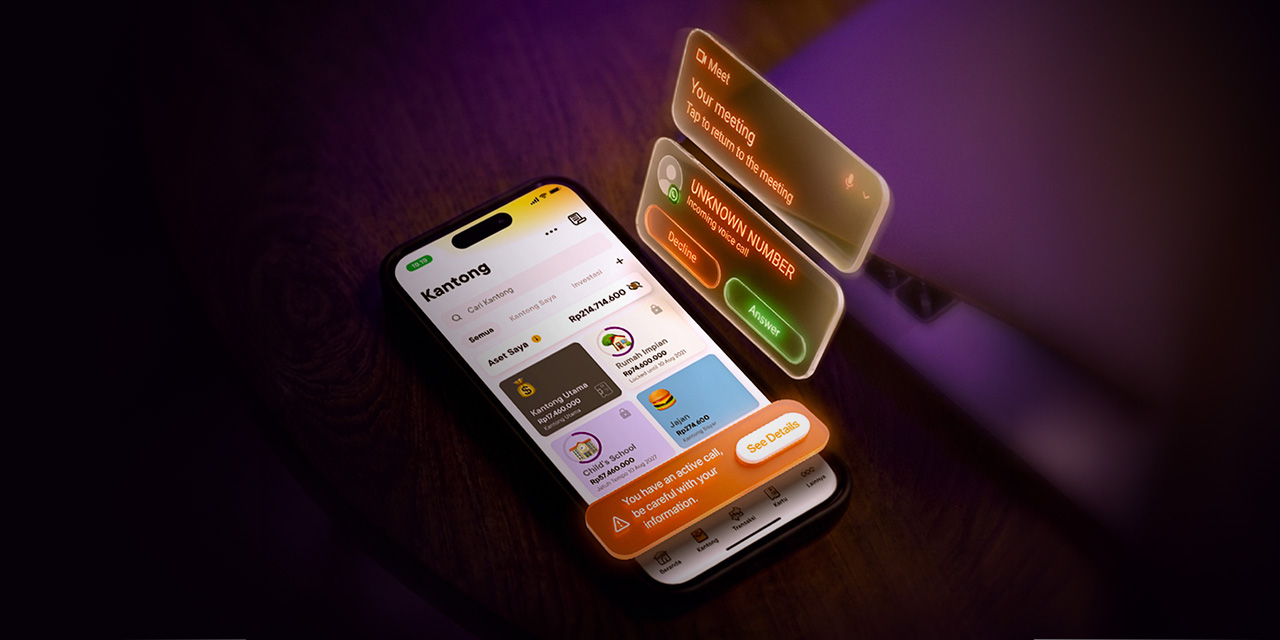
The Jago app features automatic security protection that activates whenever the system detects that your phone is on an active voice or video call.
What Happens When Jago's Protection Feature Is Active?
- Automated App Restriction: You cannot open or access the Jago app during an active call, safeguarding you from manipulative coaching by scammers.
- Direct On-Screen Security Alerts: The app displays key educational warnings, reminding you to:
- Keep sensitive data confidential: Guard your PIN, password, and OTP at all times.
- Avoid suspicious links or apps: Never download APK files or tap links sent by callers.
- Deny device access: Never grant remote access permissions or turn on screen sharing.
- Refrain from transferring to unfamiliar accounts: Pause and hold all transactions if pressured by the caller.
Jago Guidelines for Handling Suspicious Calls
If you receive a call exhibiting signs of psychological manipulation, take these proactive steps:
- Stay Calm and Hang Up: Do not let fear or panic take over. Terminate the call immediately.
- Verify Independently: Contact the relevant bank or organization directly using official numbers published on their legitimate website. Never call numbers supplied by the caller.
- Never Disclose Confidential Credentials: Legitimate banks and institutions will never ask for your PIN, password, OTP, or payment card details.
- Rely on In-App Security Protections: Leverage the built-in safeguards within the Jago app to keep your financial assets secure at all times.
By recognizing these deceptive phone tactics and taking full advantage of Jago's safety features, you can carry out digital transactions with total peace of mind.
Bank Jago Official Contacts
- Telephone: +6221 3000 0746
- Hotline Service: 1500-746
- WhatsApp: 0817-000-7460