

To make working in the office more fun with lots of beautiful memories, holding lots of events is necessary. Surprise those who are birthdaying and hold farewell parties for those who are resigning. When it comes to collecting money, you don't have to worry about it, Jagoans. There is an easy way to collect money for office events.
Jago Shared Pocket: An Easy Way to Collect Money for Office Events
Collecting money from each coworker in the office one by one feels quite complicated, right Jagoans? Not to mention the reluctance you have when you have to keep on asking them to pay. Then, if someone has already paid, you need to take note as well.
After the event is over, you also need to make a report on the money used. What gifts are bought, whether you ordered birthday or farewell cakes as well as other foods and drinks.
If you agree that the above is not easy and practical, there is a way you can try to collect money, namely by using a Shared Pocket. If you already use the Shared Pocket, you no longer need to go around the office collecting money from your coworkers. You also no longer need to prepare reports.
What is the Shared Pocket? The Shared Pocket is one of the features that you can find in the Jago application The Shared Pocket features allows easy, practical and fun financial collaboration.
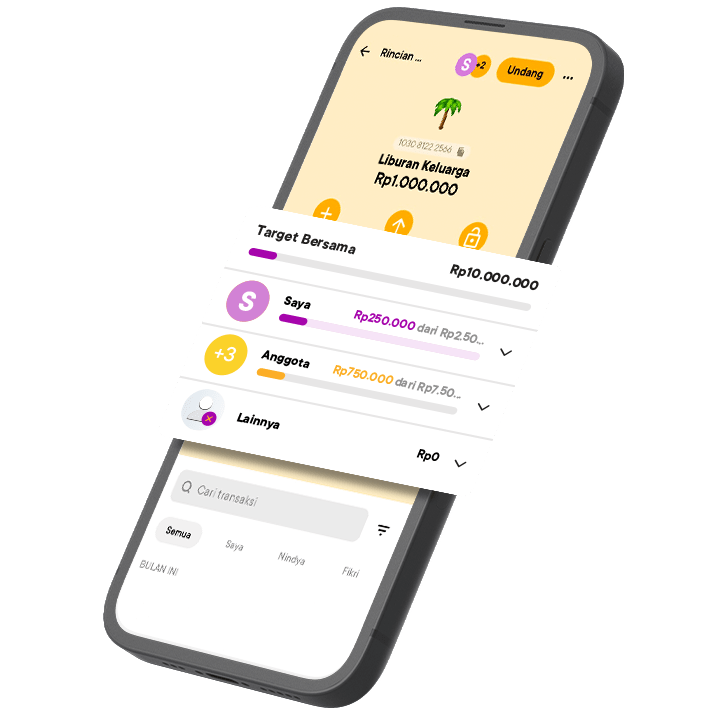
Benefits of using Jago Shared Pocket
When all colleagues have joined the Shared Pocket, Jago is ready to work to collect money from each member. When someone hasn't made a transfer to the Shared Pocket, Jago will remind them via notification. Don't worry, Jago never feels shy.
Each member of the Shared Pocket can also see the transactions that occur. You can also set some people to have more roles, not just as viewers.
For reports, the solution is very easy. You can download the available e-Statements. Every transaction made is recorded by Jago.
How to invite colleagues to join the Shared Pocket
For a Pocket to become a Shared Pocket, first you need to create a Pocket. After that, follow these steps:
- On your Pockets tab, choose the Pocket you wish to change into a Shared Pocket.
- Find and tap the Invite button on the top of the screen.
- Choose members to invite from your Jago Contact or your Phonebook.
- Select a role for the invitee.
- Once accepted, your Pocket will automatically change into a Shared Pocket.
Make sure everyone who will be invited already has a Jago account. The Jago account registration can be done via the Jago application from anywhere and at any time.