
Do you like watching movies, television series and listening to music? You must be familiar with the various streaming services available. Especially if you choose the premium package, you will be even more satisfied watching movies and listening to music. To save money and not compromise legality, chipping in with family members or friends is the solution. Isn't that right, Jagoans?
But how have you been collecting money from your friends or family members? Do you remind them one by one and then you take note of who has paid? If someone hasn't paid and keeps forgetting, how do you collect the money from them? It doesn’t sound so nice if you keep asking, does it?
Have you heard of the Shared Pocket? If you use it, chipping in will become more practical and easier.
Chipping in for Streaming Services is Hassle-free with the Shared Pocket
What is the Shared Pocket and what are its benefits?
The Shared Pocket is one of the features that you can find in the Jago application, which is owned by Bank Jago. You can invite friends, family members or anyone you want to join a Shared Pocket.
Benefits of using the Shared Pocket
If you already use the Shared Pocket, you no longer need to remind each member to pay. Later, Jago will remind them.
Then, you and each member can also see who has paid and who has not. Every incoming and outgoing transaction will always be recorded to maintain transparency.
You can also arrange for the transfers to the streaming service providers to be automatic and on time. You can connect your Shared Pocket with the Plan Ahead feature.
The cool thing is, the budget for subscription to streaming services will not mix with other budgets because you have created a separate Pocket or some Pockets.
How to create a Shared Pocket via the Jago application
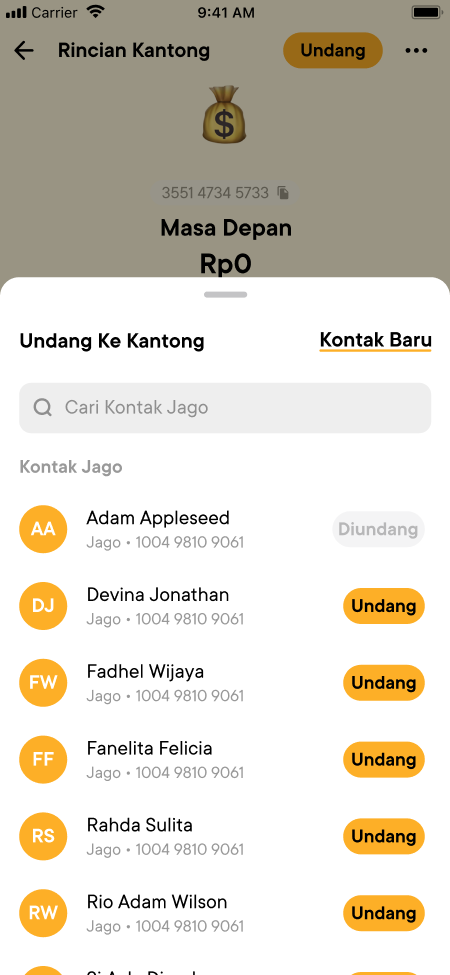
Now, it's just a matter of how to create a Shared Pocket. You can follow these simple steps:
- On your Pockets tab, choose the Pocket you wish to change into a Shared Pocket.
- Find and tap the Invite button on the top of the screen.
- Choose members to invite from your Jago Contact or your Phonebook.
- Select a role for the invitee.
- Once accepted, your Pocket will automatically change into a Shared Pocket.
Make sure everyone that you want to invite already has a Jago account. Registration can be done at any time via the Jago application.