


Did you ever want to transfer to another bank but got frustrated because you had to pay a transfer fee? You didn’t make the transfer from the Jago application, did you? If you have used the Jago application launched by Bank Jago, you will be free from frustration because you can enjoy free interbank transfers.
The Transfer & Pay Feature Makes Transfers Easy and Practical
After completing your Jago account registration, once you open the Jago application, you can immediately find the Transfer & Pay feature.
Every time you want to transfer to another Jago user or to a friend who has an account at another bank, you can immediately click Transfer & Pay. The process is fast and easy. The transfer can be made anytime and from anywhere.
You just need to follow these steps:
- Go to Transfer & Pay on the Home page.
- Search from an existing contact, or choose New Contact. (If it’s from an existing contact, skip to step 6)
- Choose a Bank.
- Choose Jago or Other Banks.
- Input Jago ID or destination account number, click Check and tap Next.
- Input the amount and tap Next.
- Review the transfer summary, then choose Send Now.
Jago ID or other bank account numbers that you have inputted will be automatically saved in Contacts. So, the next time you want to transfer to the same person, you don’t need to re-input the Jago ID or destination account number. Very practical, right?
After the money is sent to the destination account within a few seconds, you can send proof of transaction directly from the Jago application. Oh yes, proof of transactions and transaction history will never disappear from the Jago application.
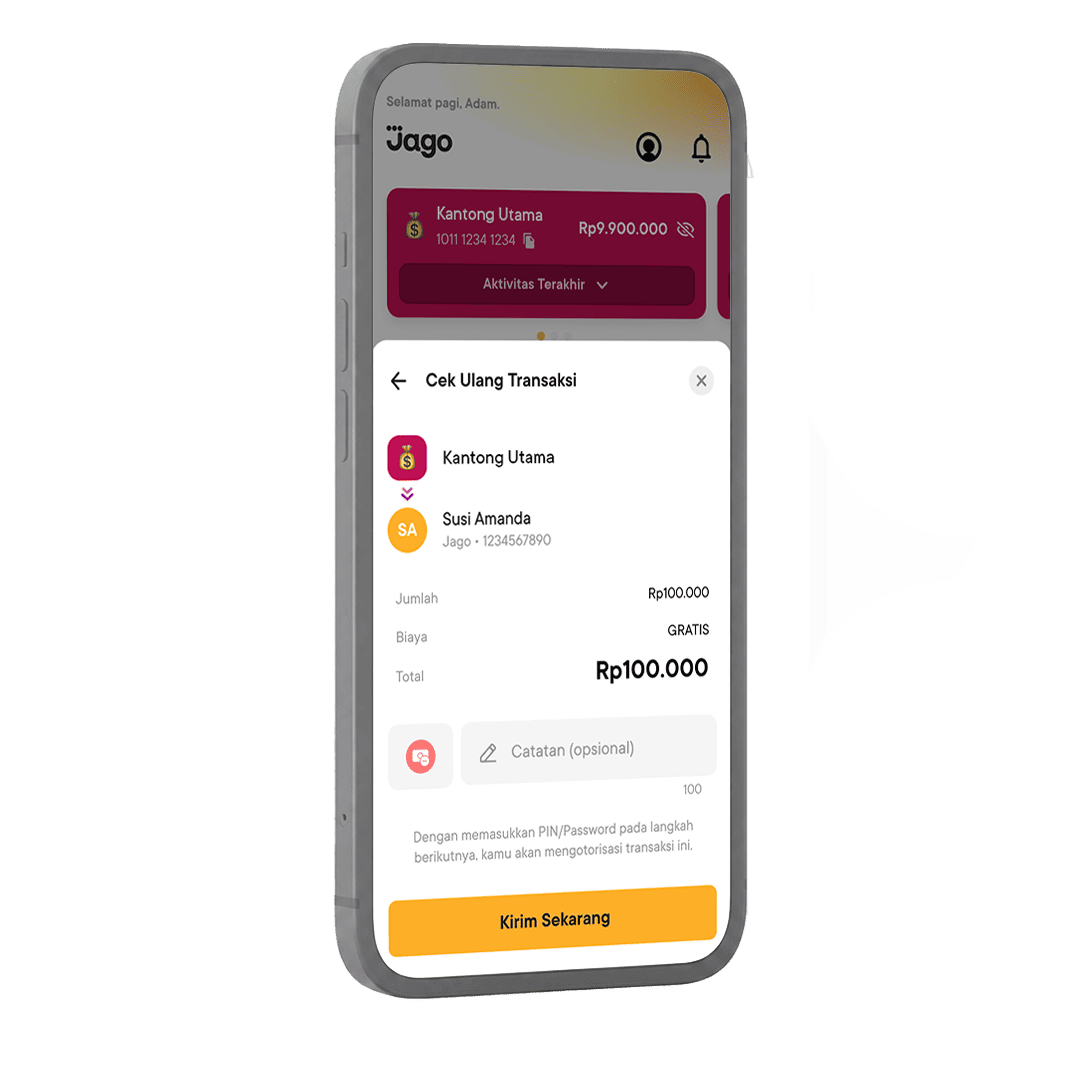
Other Benefits of the Transfer & Pay Feature
In addition to making it easier to transfer money to any bank, you can also use the Transfer & Pay feature to top up your e-Wallet. And, just like bank transfers, you can also top up your e-Wallet free of admin fees with the same quota.
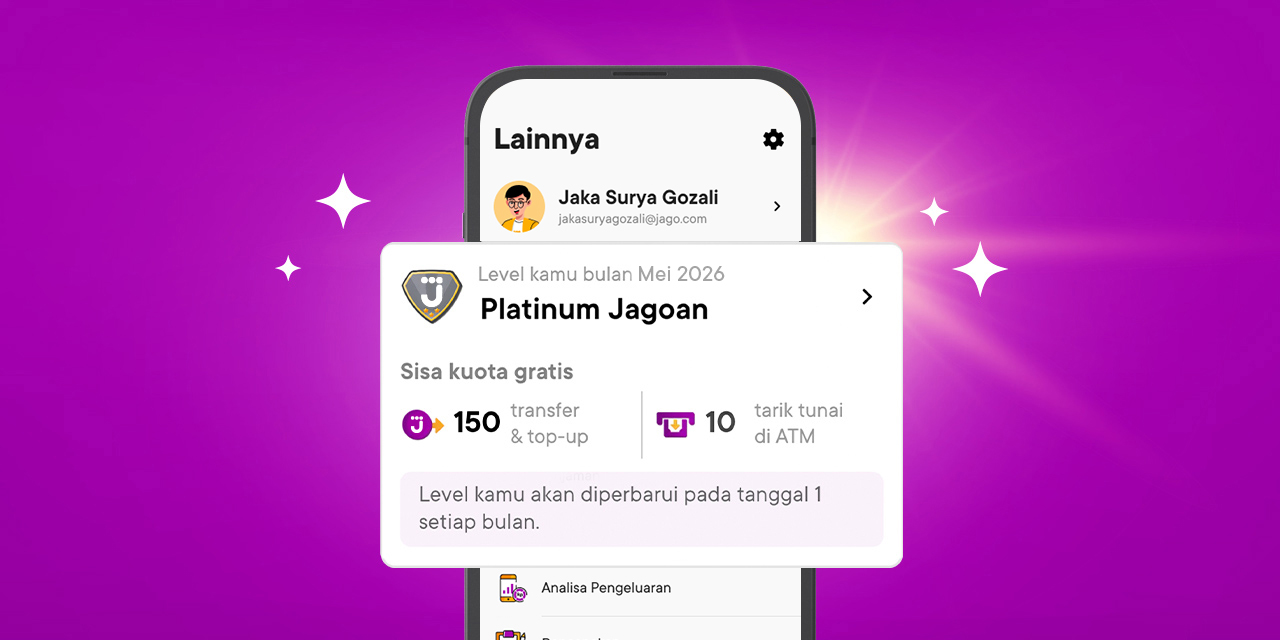
In total, in one month you have a free quota of up to 150x for transfers to other banks and e-Wallet top-ups. You can use all of them only for transfers or top-ups or a combination of both.
This is how you top up your e-Wallet easily:
- Go to Transfer & Pay on the Home page.
- Choose New.
- Choose e-Wallet.
- Choose the wallet that you want to top up.
- Enter your wallet account number or choose from your phonebook, click Check, then choose Next.
- Input the amount and choose Next.
- Review the top-up summary, then choose Top Up Now.
Then, Transfer & Pay can also help you pay various bills, such as water, electricity, cable TV and credit card bills, quickly. So that you don’t forget to pay your bills every month, you can set for the bills to be paid automatically by Jago with the Plan Ahead feature.
Transfers from Bank Jago to Other Banks are Pending or Money is Not Received by Destination Account, What Should be Done?
Have you ever sent money from Bank Jago to another bank but the money never reached the recipient? Or have you made a payment or completed a transaction but failed and your balance has been deducted?
If you experience any of the above, there's no need to panic. You can immediately report via email to [email protected] or directly dispute the transaction through the Jago application. It is highly recommended that you make a transaction dispute for a maximum of 14 days from the date of the transaction.
After successfully disputing the transaction, Bank Jago will check whether you are eligible for a refund. If so, the refund will be processed and you will be notified by email of the progress.
How to Dispute Transactions for Refunds in the Jago Application
If you need to dispute a transaction, you can follow these simple steps:
- Log in to your Jago account in the Jago application.
- Tap Pockets at the bottom of your screen, then tap the receipt icon in the top-right corner.
- Choose the transaction to dispute. Make sure the transaction status is successful.
- Once the transaction details appear, click the question mark symbol at the top right and select I Still Need Help
- Fill in the details of your dispute.
- Bank Jago will receive the transaction dispute report and conduct an investigation.
The Higher Your Account Level, the More Free Transfer and Top-up Quota from Jago
As stated above, there is a free quota that you can enjoy by having a Jago account. The way to do this is by leveling up. At the highest Account Level, you get the most quota for free interbank transfers and e-Wallet top-ups.
Read in full about Jago Account Levels in this article.
Frequently Asked Questions About Transfers and Top-Ups from Bank Jago
1. How many times can I get free transfers with Bank Jago?
Bank Jago provides a varying number of free interbank transfers and e-wallet top-ups, depending on the customer's Account Level. The higher the Jago account level (Jagoan, Silver Jagoan, Gold Jagoan, up to Platinum Jagoan), the more free transfers a customer can enjoy, which can go up to 150 times per month. Once the free quota is used up, subsequent transfers will be charged according to the applicable rates, for example Rp2,500 per transaction for the BI-FAST method. Transfers to fellow Jago users and GoPay top-ups are always free with no quota limits.
2. How to check my free quota for transfers and e-Wallet top-ups in the Jago application?
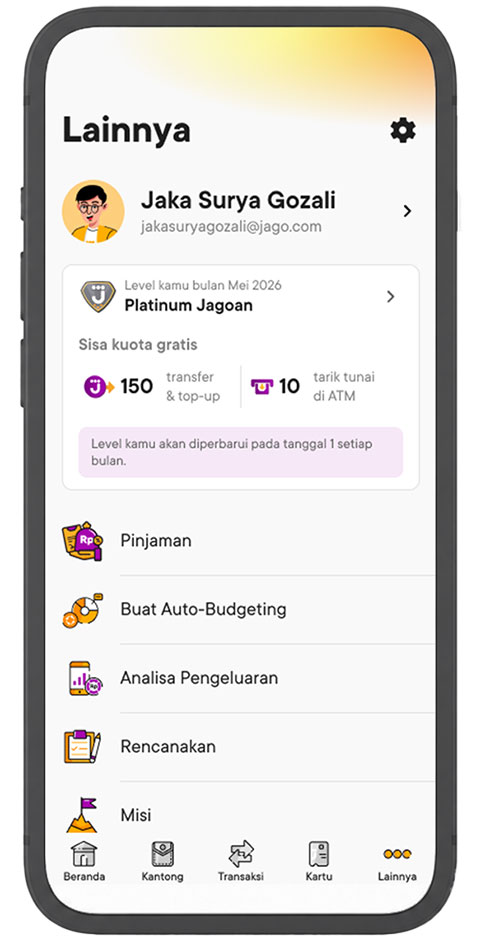
To find out the quota for free transfers to other banks from Bank Jago and topping up e-Wallet as well as the quota for free cash withdrawals with a Jago debit card from the nearest ATM, you can do the following steps:
1. Log in to the Jago application and click the “More” menu
2. You can immediately see your Account Level and the remaining quota for the current month.
3. Where can Bank Jago transfer money?
Bank Jago offers the convenience of transferring funds to various destinations within Indonesia. You can transfer money to other Jago accounts or send money to other Indonesian bank accounts using various methods such as BI-FAST, Real Time Online (RTOL), SKN, and RTGS, all with different limits. Additionally, you can easily top up various e-wallets.
4. Can Bank Jago be used to transfer to Virtual Accounts?
Absolutely! You can pay various bills or top up services via Virtual Account (VA). From e-commerce payments and tuition fees to recharging your e-wallet balances, everything can be done conveniently and in real-time through the Jago application.
5. How do I transfer to a Virtual Account in Jago?
Transferring money to a VA in Jago is very easy and only takes a few steps:
-
Go to the Transfer & Pay menu on the Jago app home screen.
-
Select New Recipient.
-
Choose Virtual Account (you can enter the VA number directly or select from the list of available institutions/services).
-
Enter the amount (if it is not automatically filled), select the Pocket as the source of funds, and confirm the payment.
For a more detailed guide regarding Virtual Account payments, you can visit this page directly.
6. Can Bank Jago transfer money abroad or internationally?
Currently, Bank Jago does not offer international money transfer services. The transfer features available in the Jago application support sending funds to other Jago accounts or to other domestic bank accounts. However, for customers who want to transact abroad, Bank Jago facilitates this through its Jago Visa Debit Card. By activating the international payment option on this card, you can make payments at international merchants, both offline and online, as well as withdraw cash from any ATM with the Visa logo worldwide. You can also link your Jago Visa Debit Card and Jago account with PayPal.
7. How can I get proof of transactions in Bank Jago?
You can view and download the transaction proof directly through the Jago application. Simply select the relevant Pocket, view the transaction history, and select the desired transaction. Then, you can choose to share or download the transaction proof.
8. Can I search for specific transactions in the Jago application?
Certainly. The Jago application has a search feature that makes it easy for you to find transaction proof without having to manually scroll through the history. Select the relevant Pocket, then type the keyword into the search bar above the transaction history.
9. Can Bank Jago receive money from abroad?
Yes, Bank Jago can receive money sent from abroad. The recipient must first have a Foreign Currency Pocket that matches the foreign currency being received. Learn more about transferring money from abroad to Bank Jago here.